
Die Einstellungen für IhreFortigate (Fortinet) finden Sie hier. Bitte beachten Sie, dass es je nach Modell und Software-Stand zu Abweichungen kommen kann.
Es empfiehlt sich, folgender Anleitung zu folgen: Fortigate
How to disable SIP-ALG (SIP Helper) on Fortinet
Open the Fortigate CLI from the dashboard. Enter the following commands in FortiGate’s CLI
config system settings
set sip-helper disable
set sip-nat-trace disable
reboot the device
Reopen the FortiGate CLI and enter the following commands (do not enter the text after //)
config system session-helper
show // you need to find the entry for SIP, usually 12, but it may vary
delete 12 // or the number that you identified from the previous command
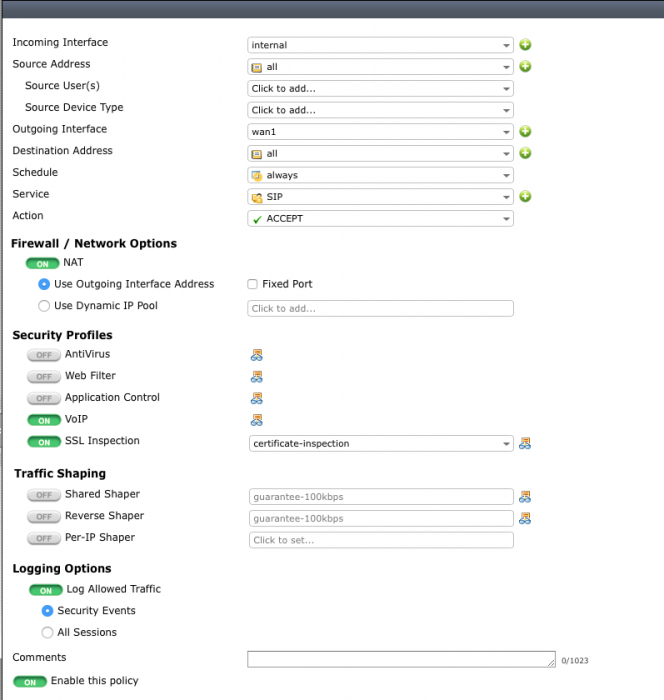
Create a rule and set it like in the picture above Reboot the device and you should be ready
Disable RTP processing as follows
config voip profile
edit default
config sip
set rtp disable
Eine Komplette Anleitung zur VoIP Konfiguration für FortiOS 5.6 finden Sie in diesem Dokument: